Mailbox Quota Warning - What It Means and What to Do
How to Upgrade Your Mailbox in Your Online Account
How to Upgrade Your Mailbox in Your Online Account
- You can easily upgrade your mailbox size through your Mweb Online Account. The change is quick and takes effect immediately after confirmation.
Why Upgrade Your Mailbox?
More space means:
- No more “mailbox full” messages
- Space for attachments and important emails
- Less time cleaning up your inbox
Simple upgrade. Better experience.
Step 1: Log in to your Online Account
Go to http://my.mweb.co.za and sign in with your details.
Step 2: Go to All Services
From the left-hand menu:
My Services > All Services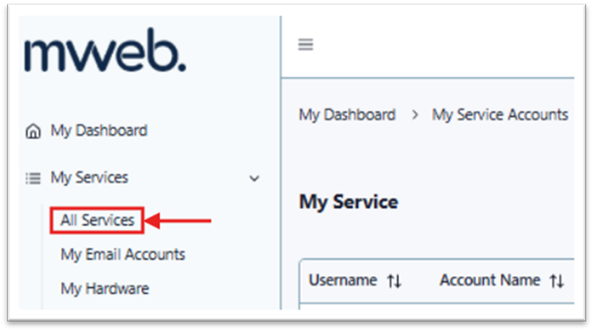
Step 3: Open your service details
Find your product and click the eye icon to view more details.
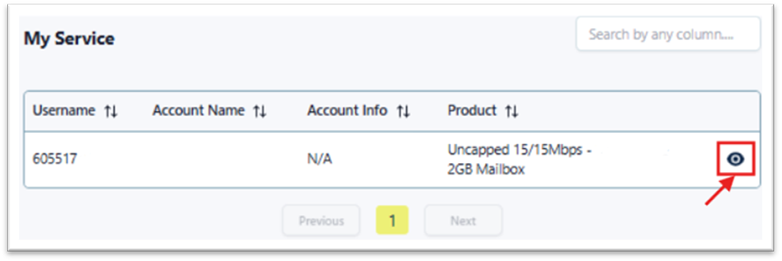
Step 4: Select your mailbox
Under Contracts, locate your mailbox and click Change.
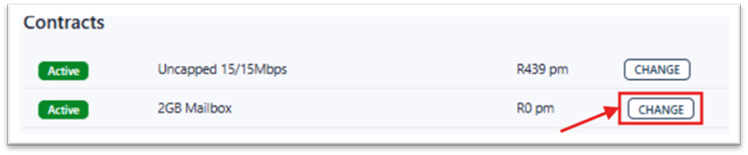
Step 5: Choose your new mailbox size
Pick the option that suits your needs:
- 10GB
- 25GB
- 50GB
Click Choose This Option to continue.
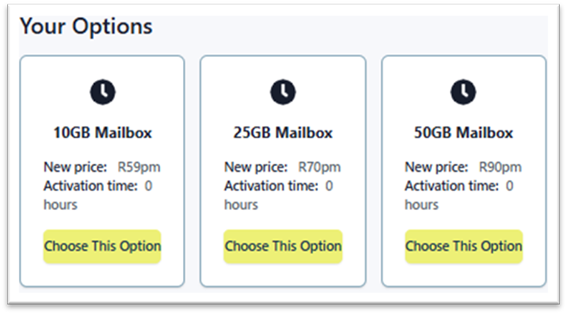
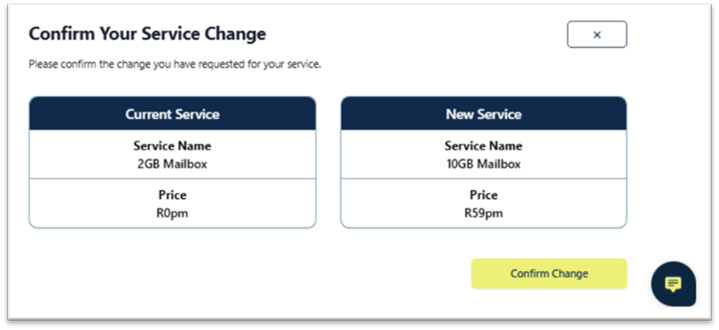
Step 6: Confirm your upgrade
You’ll see a summary of your current and new mailbox.
Click Confirm Change to proceed.
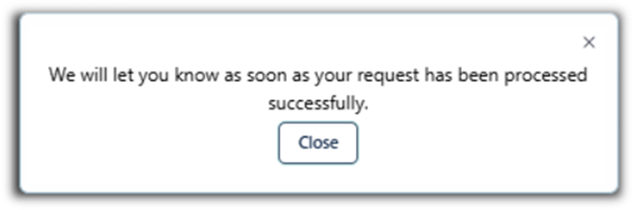
Step 7: Done
A confirmation message will appear once the upgrade is successful.
Your new mailbox is ready to use immediately.
- Your upgrade is instant
- New pricing applies from your next bill
- You can upgrade again anytime
©Mweb (Pty) Ltd. All rights reserved.