How to Log In to Webmail
How to Log In to Webmail
You can access your Mweb email from any modern browser using Webmail. All you need is your full Mweb email address and your mailbox password.
How to log in
-
Open your browser
Use the latest version of Chrome, Edge, Firefox or Safari for the best results. -
Go to the Webmail login page
-
Visit www.mweb.co.za and select Email from the top menu
-
Or go directly to www.mweb.co.za/webmail
-
-
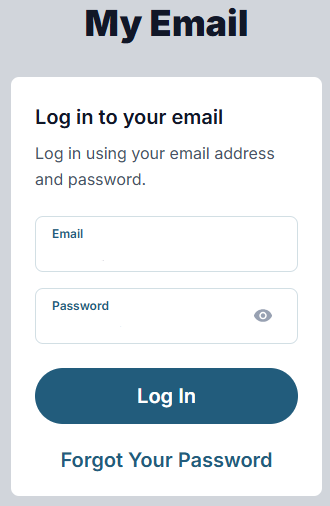
Enter your email address
Type your full Mweb email address, for example, yourname@mweb.co.za. -
Enter your password
Use the password linked to this email address. -
Click “Log In”
You will be taken to Webmail.
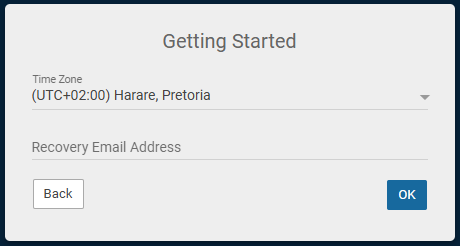
First-time login: Required setup
On your very first login, Webmail will ask you to confirm a few details before you can open your inbox.
1. Select your time zone
Choose your local time zone. South African customers should select
(UTC+02:00) Harare, Pretoria.2. Enter a recovery email address
Enter an email address you have access to, for example, Gmail or Outlook.
-
Click “OK”
You will then be taken to your mailbox.
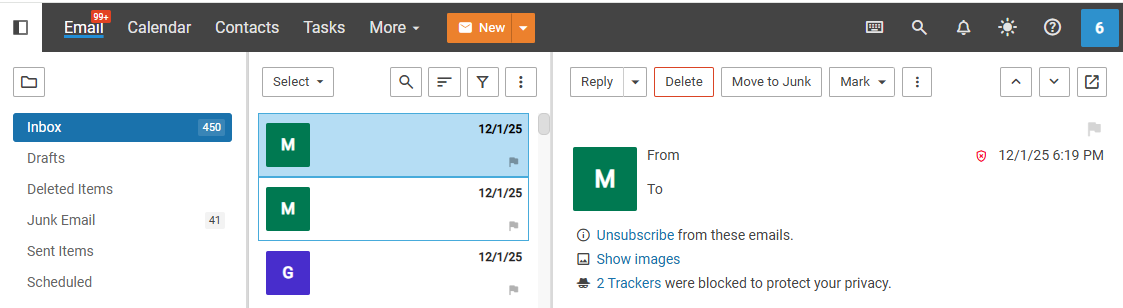
Logged in
Once you are signed in, you can:
-
Read and reply to messages
-
Compose new emails
-
Manage folders and settings
-
Access contacts, calendar and more
-
Troubleshooting login issues
- Forgot your password?
Select Forgot Your Password on the login page and follow the steps. - Login blocked after too many attempts?
Wait 15 minutes, then try again. You can also reset your password. - Make sure you are using the correct email address
Include the full address ending with e.g. @mweb.co.za. - Password not working?
Check for typing mistakes and ensure Caps Lock is off. - Browser issues?
Clear your browser cache and cookies, then reload the page.
Try using Chrome, Edge, Firefox or Safari. - Trying to access your Online Account instead?
If you are looking for bills, products or account details, use your
Online Account. Webmail is only for reading and sending emails.
- Forgot your password?
Security tip
Always log out if you are using a shared or public device.
Never share your password, and avoid saving it in your browser on shared computers.
©Mweb (Pty) Ltd. All rights reserved.