You can choose which email address your messages are sent from by setting a Default From Address in webmail. This is useful if you use email aliases and want email to come from a specific address.
How to Set an Email Alias as Your Primary Sending Address
How to Set an Email Alias as Your Primary Sending Address
How to Change It
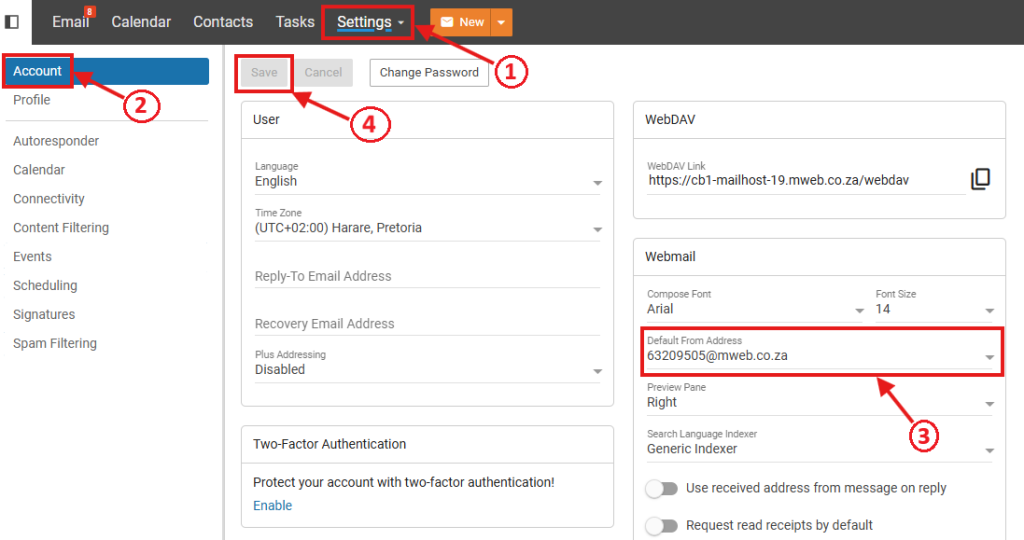
- Click Settings at the top of the page.
- Select Account from the menu on the left.
- Go to the Webmail section.
- Open the Default From Address drop-down.
- Select the alias you want to use.
- Click Save.
New emails will now send from the selected address by default.
Good to Know
- This only changes the address used when sending email.
- All mail still arrives in the same mailbox.
- Replies will come back to the same mailbox.
- This setting applies to webmail only.
- If you use Outlook or another mail app, the alias must be set up there separately.
Don’t See Your Alias?
If your alias does not appear in the list, it is not set up as an alias. You will need to log in to your Online Account to set it up https://my.mweb.co.za/my-email-accounts
Related Articles
©Mweb (Pty) Ltd. All rights reserved.